Model Training
The Model Training tab lets you configure and launch training of a deep learning segmentation model on the patches extracted in the previous step. Parameters are organized into Basic and Advanced sub-tabs.
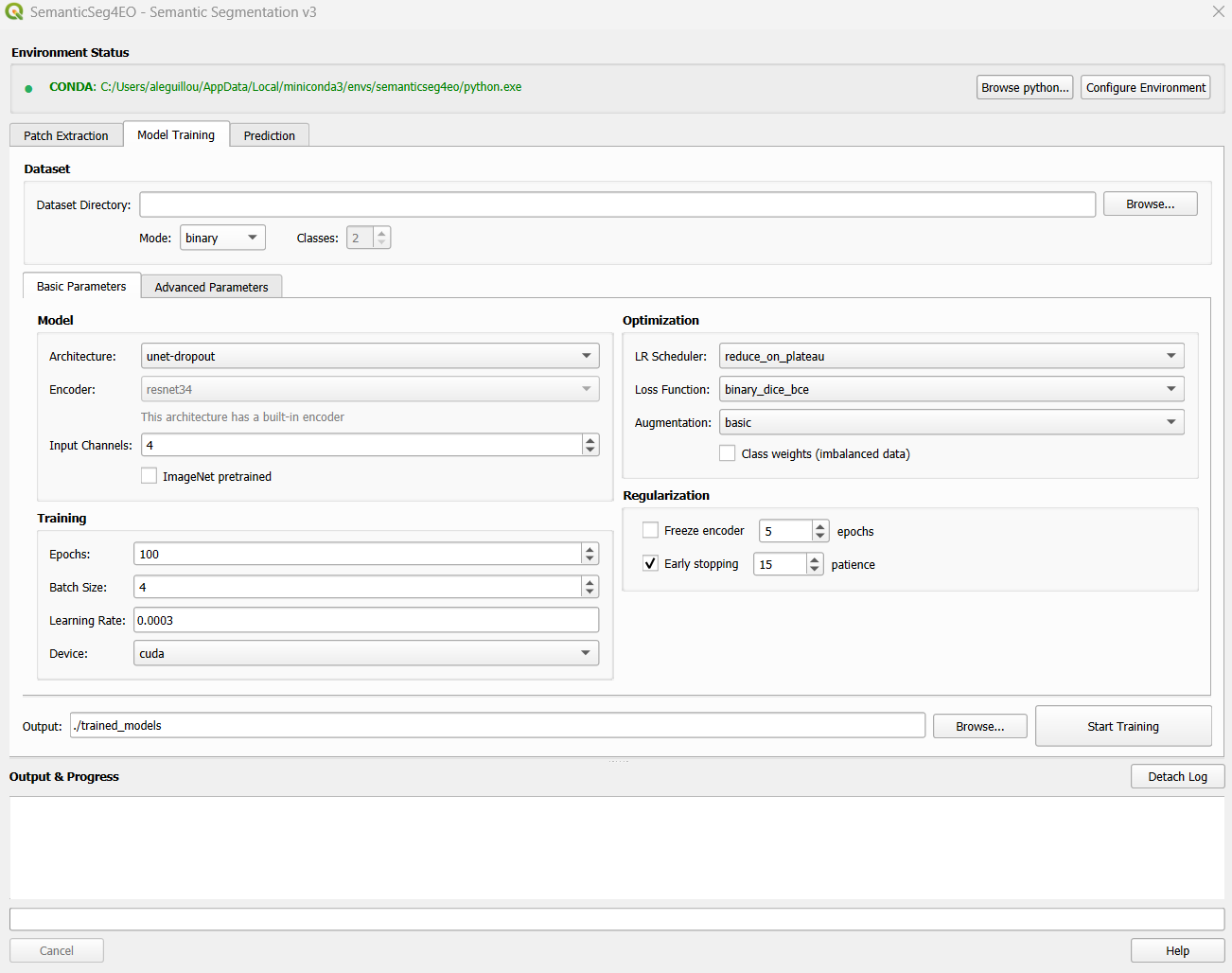
The Model Training tab, showing Basic Parameters.
Dataset Configuration
At the top of the tab, configure the dataset before choosing any model parameters.
Field |
Description |
|---|---|
Dataset Directory |
Path to the folder created by Patch Extraction.
Must contain |
Mode |
|
Classes |
Number of output classes. Only active in |
Basic Parameters
The Basic Parameters sub-tab is the main interface for most users. Parameters are split into two columns: Model (left) and Optimization + Regularization (right).
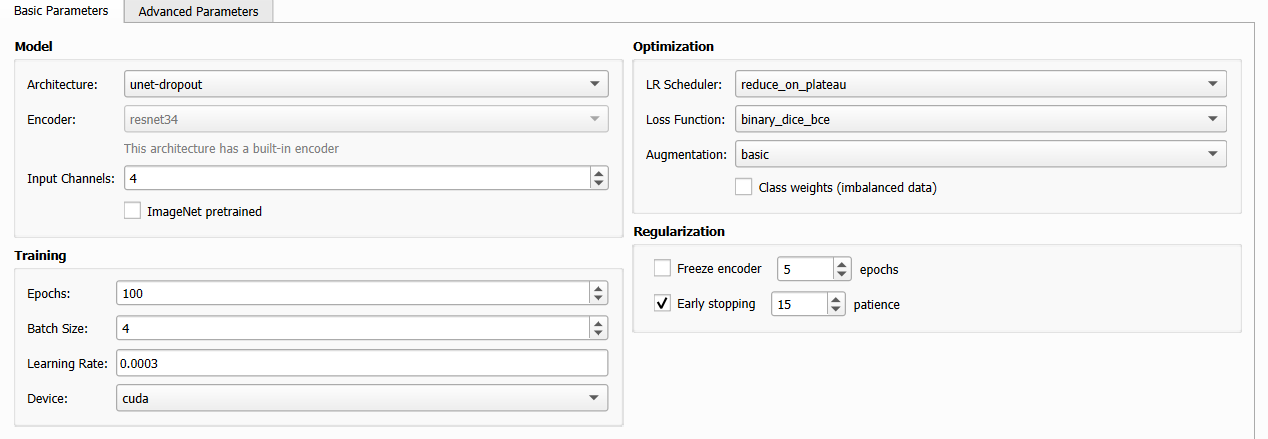
Basic Parameters: model selection on the left, optimization on the right.
Model Group
Parameter |
Default |
Description |
|---|---|---|
Architecture |
|
The segmentation model architecture. See Architectures & Encoders for the full list and requirements. |
Encoder |
|
Backbone encoder for SMP-based architectures. Not shown for self-contained architectures (SegFormer, HRNet, SwinUNet, unet-dropout). See Architectures & Encoders. |
Input Channels |
4 |
Number of bands in your image patches. Must match the actual patch data. For Sentinel-2 RGB: 3, for 4-band (RGB+NIR): 4. |
ImageNet pretrained |
unchecked |
Use pretrained ImageNet weights for the encoder (strongly recommended
when using SMP architectures). Not available for |
Training Group
Parameter |
Default |
Description |
|---|---|---|
Epochs |
100 |
Maximum number of training epochs. With early stopping enabled, training may stop before this limit. Typical range: 50–200. |
Batch Size |
4 |
Number of patches per training step. Reduce to 2 or 1 if you encounter GPU out-of-memory errors. |
Learning Rate |
0.0003 |
Initial learning rate for the optimizer (Adam). Recommended: 0.0001–0.0003 for pretrained encoders, 0.001 for training from scratch. |
Device |
|
|
Optimization Group
Parameter |
Default |
Description |
|---|---|---|
LR Scheduler |
|
Strategy for reducing the learning rate during training. See Learning Rate Schedulers below. |
Loss Function |
|
Loss function used during training (auto-switched based on mode). See Loss Functions. |
Augmentation |
|
Level of data augmentation applied during training. See Data Augmentation. |
Class weights |
unchecked |
Compute and apply per-class weights to address class imbalance. Useful when one class is much rarer than others. |
Regularization Group
Parameter |
Default |
Description |
|---|---|---|
Freeze encoder |
unchecked |
Freeze the encoder weights for the first N epochs, training only the decoder. Useful to stabilize training when using a pretrained encoder. |
Freeze epochs |
5 |
Number of epochs to keep the encoder frozen before unfreezing. Only active when “Freeze encoder” is checked. |
Early stopping |
checked |
Automatically stop training if the validation metric does not improve. |
Patience |
15 |
Number of epochs to wait for improvement before stopping. Increase for noisier datasets. |
Output
At the bottom of the tab, configure where the trained model is saved:
Field |
Description |
|---|---|
Output Directory |
Folder where the trained model ( |
Tip
The best checkpoint (by validation metric) is saved automatically as
best_model.pth in the output directory. Training curves (loss and metric
vs. epoch) are also saved as a PNG image.
Learning Rate Schedulers
Scheduler |
Description |
|---|---|
|
Reduces LR by a factor when the validation metric stops improving. Good default for most datasets. |
|
Smoothly decreases LR following a cosine curve. Effective for pretrained models. |
|
Increases LR briefly then decreases it (super-convergence). Fast convergence on clean datasets. |
|
Fixed learning rate for the entire training run. |
Advanced Parameters
The Advanced Parameters sub-tab exposes fine-grained control over model regularization, loss function hyperparameters, and cross-validation.
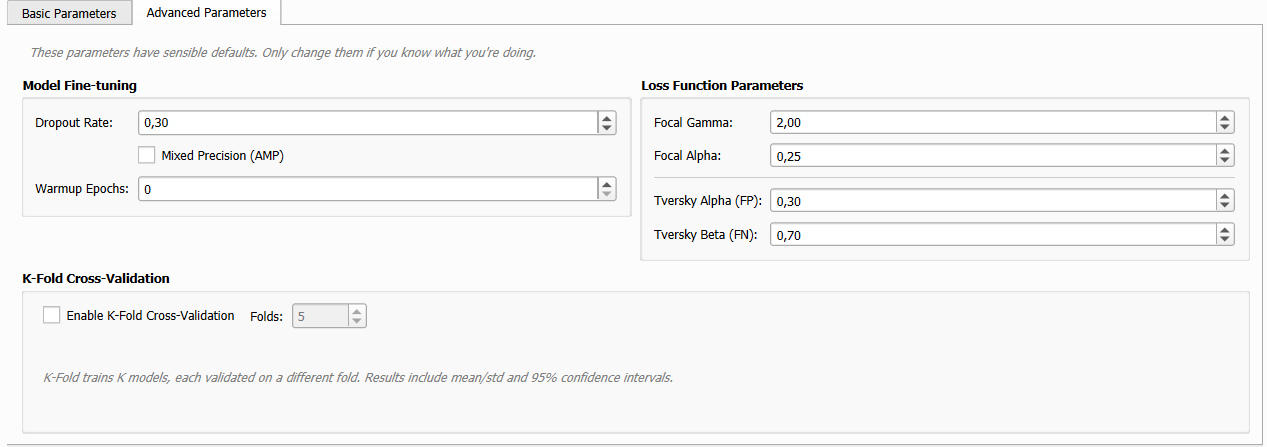
Advanced Parameters: fine-tuning options.
Note
These parameters have sensible defaults. Only adjust them if you understand their effect on training.
Model Fine-Tuning
Parameter |
Default |
Description |
|---|---|---|
Dropout Rate |
0.3 |
Probability of dropping a neuron during training (regularization). 0.0 disables dropout. Range: 0.0–0.7. |
Mixed Precision (AMP) |
unchecked |
Use FP16 for faster training with less GPU memory. GPU only — has no effect on CPU. |
Warmup Epochs |
0 |
Gradually increase LR from 0 to the target value over N epochs before the main scheduler takes over. Useful with large pretrained models. |
Loss Function Parameters
Focal Loss parameters:
Parameter |
Default |
Description |
|---|---|---|
Focal Gamma |
2.0 |
Controls how much the loss focuses on hard-to-classify examples. Higher values → more focus on difficult pixels. Range: 0.5–5.0. |
Focal Alpha |
0.25 |
Weight for the positive class in the focal loss. Increase for highly imbalanced datasets. Range: 0.1–0.9. |
Tversky Loss parameters:
Parameter |
Default |
Description |
|---|---|---|
Tversky Alpha (FP) |
0.3 |
Weight assigned to false positives. Lower = more false positives tolerated (higher recall). |
Tversky Beta (FN) |
0.7 |
Weight assigned to false negatives. Higher = stronger penalty for missed detections (higher recall). |
K-Fold Cross-Validation
When enabled, K-Fold CV replaces the fixed train/val/test split:
Parameter |
Default |
Description |
|---|---|---|
Enable K-Fold |
unchecked |
Pool all patches (train + val + test) and split into K folds. K models are trained and evaluated sequentially. |
Folds (K) |
5 |
Number of folds. Typical values: 5 or 10. |
K-Fold outputs results as mean ± standard deviation and provides 95% confidence intervals over all folds.
Note
K-Fold training takes K times longer than standard training. Start with K=5 for initial experiments.
Reading the Training Log
During training, the output panel shows epoch-by-epoch progress:
Epoch  1/100 | Train Loss: 0.4321 | Val Loss: 0.3980 | Val IoU: 0.6123
Epoch  2/100 | Train Loss: 0.3876 | Val Loss: 0.3541 | Val IoU: 0.6458
...
Epoch 18/100 | Train Loss: 0.2103 | Val Loss: 0.2890 | Val IoU: 0.7812
→ Best model saved (IoU: 0.7812)
...
Early stopping: no improvement for 15 epochs.
Training complete. Best model: epoch 18, Val IoU: 0.7812
For multi-class mode, per-class IoU metrics are also reported at the end.
Recommended Configurations
Fast experiment (CPU, small dataset)
Architecture:
unet-dropoutEncoder: N/A
Epochs: 30, Batch: 4, LR: 0.001
Augmentation:
basicLoss:
binary_dice_bceordice_ceDevice:
cpu
Production (GPU, pretrained)
Architecture:
unetordeeplabv3+Encoder:
resnet34orefficientnet-b3Pretrained: ✓
Epochs: 100, Batch: 8, LR: 0.0003
Augmentation:
advancedLoss:
binary_dice_bce/dice_ceFreeze encoder: ✓ (5 epochs), Early stopping: ✓ (15 patience)
Device:
cudaAMP: ✓
Modern architecture (Transformer)
Architecture:
segformer-b2orunetformerEncoder: N/A (self-contained)
Epochs: 80, Batch: 4, LR: 0.0001
Augmentation:
advancedWarmup Epochs: 5
Device:
cuda, AMP: ✓