Patch Extraction
The Patch Extraction tab slices large satellite GeoTIFFs into fixed-size georeferenced patches suitable for deep learning training. It supports both single-image and batch extraction modes.
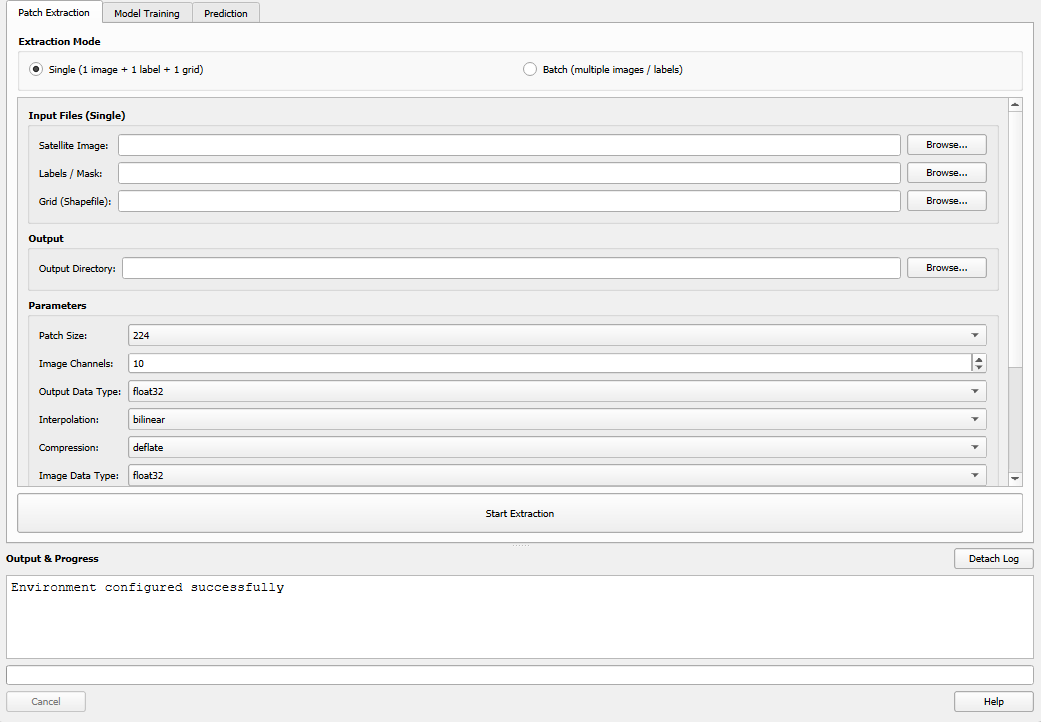
The Patch Extraction tab.
Extraction Modes
Two modes are available via radio buttons at the top of the tab:
Single Mode: Extract patches from one image + one label + one grid
Batch Mode: Extract from multiple image/label pairs at once
Click the appropriate radio button — the input fields will switch accordingly.
Single Mode
Use single mode for straightforward one-off extractions.
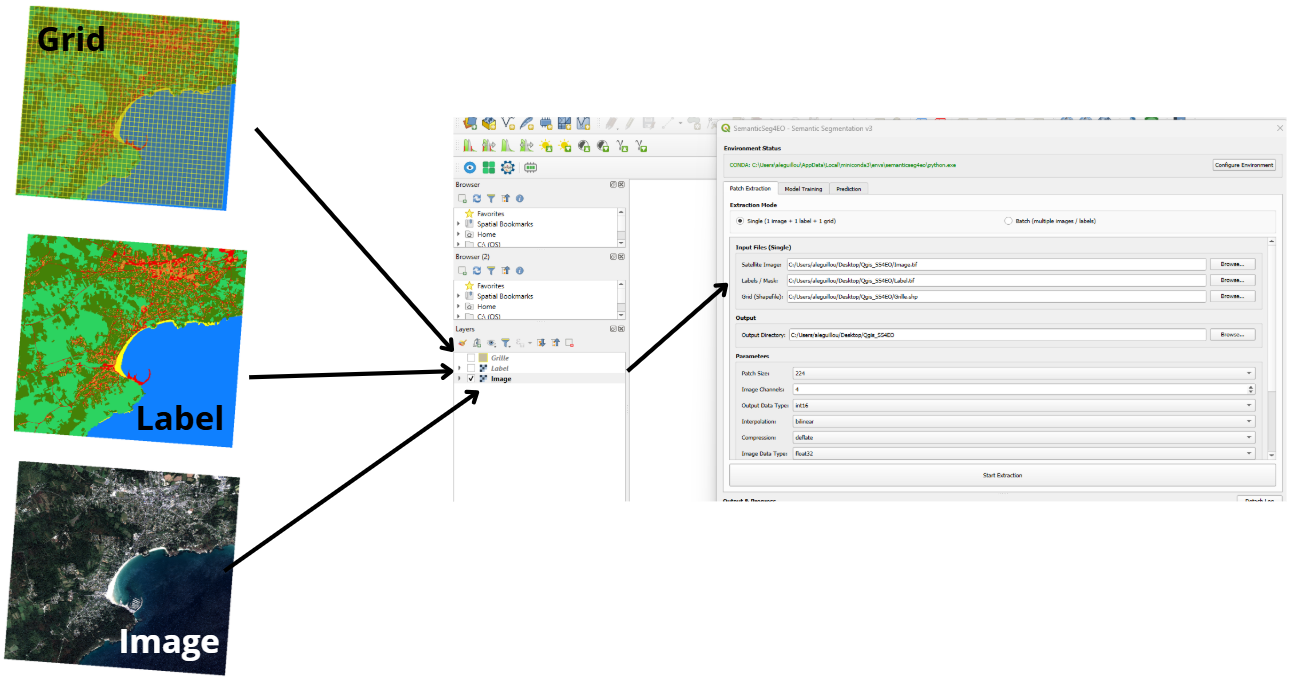
Single mode: one image, one label, one grid.
Required inputs:
Field |
Description |
|---|---|
Satellite Image |
Path to a multi-band georeferenced GeoTIFF (e.g., Sentinel-2) |
Labels / Mask |
Path to a single-band GeoTIFF with integer class values |
Grid (Shapefile) |
Path to a |
Output Directory |
Folder where extracted patches will be saved |
Batch Mode
Use batch mode to process multiple image/label pairs in one operation. This is particularly useful when working with large mosaicked datasets or multi-date time series.
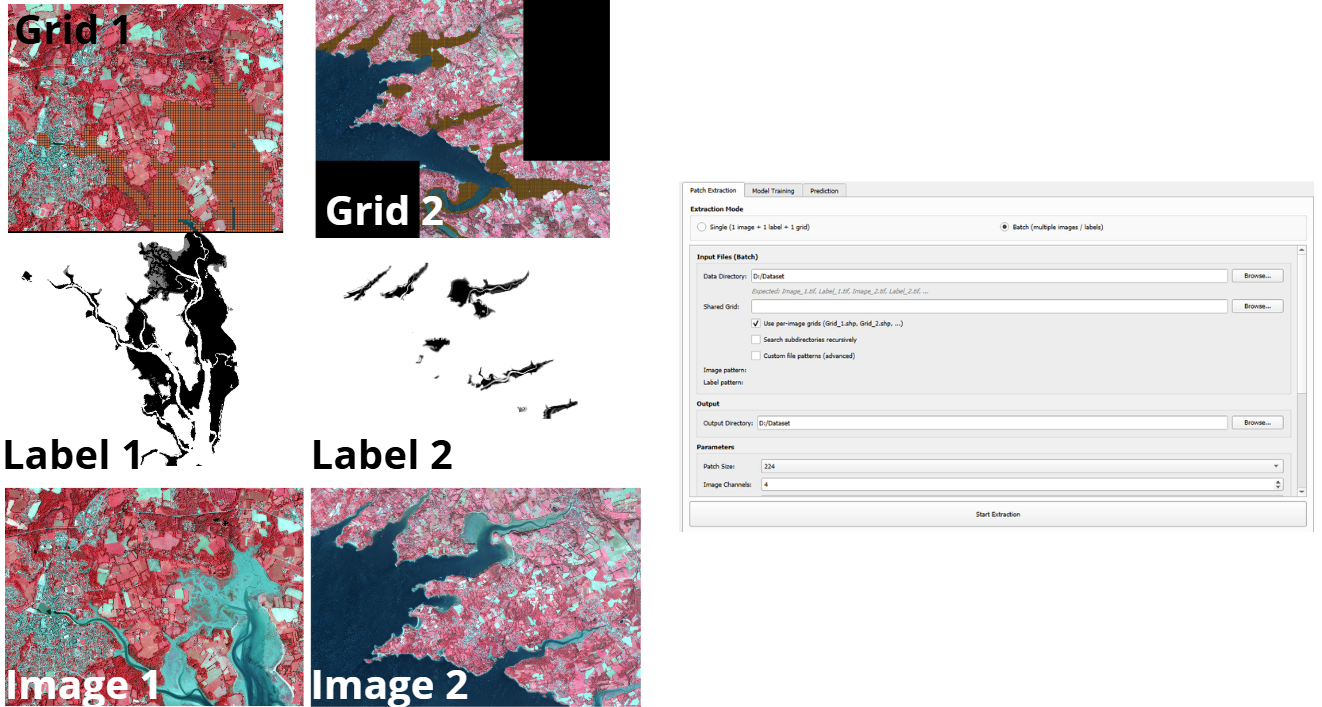
Batch mode: data directory + optional shared grid.
Required inputs:
Field |
Description |
|---|---|
Data Directory |
Folder containing all your image and label files |
Shared Grid |
A single |
Output Directory |
Folder where extracted patches will be saved |
File Naming Convention
By default, batch mode expects files named following this convention:
Image_1.tif,  Label_1.tif
Image_2.tif,  Label_2.tif
Image_3.tif,  Label_3.tif
...
The matching is case-insensitive. Files are paired by the numeric index (1, 2, etc.).
Per-image Grids (optional)
Check “Use per-image grids” to use a different grid for each image pair.
Per-image grid files must follow the naming pattern Grid_N.shp
(where N matches the image/label index):
data_folder/
├── Image_1.tif
├── Label_1.tif
├── Grid_1.shp        ← grid for pair 1
├── Image_2.tif
├── Label_2.tif
├── Grid_2.shp        ← grid for pair 2
If a per-image grid is not found for a given pair, the shared grid is used as a fallback.
Custom File Patterns (Advanced)
If your files do not follow the default Image_N / Label_N naming, you can
define custom regex patterns by expanding the Advanced Options section:
Field |
Default Regex |
Example match |
|---|---|---|
Image Pattern |
|
|
Label Pattern |
|
|
The capture group (\d+) must capture the index used to pair images and labels.
The match is case-insensitive.
Batch Output Naming
Batch mode adds an img1_, img2_ … prefix to all patch filenames to avoid
collisions when multiple pairs produce the same patch indices.
output_dir/
├── train/
│   ├── img1_patch_0001_image.tif
│   ├── img1_patch_0001_label.tif
│   ├── img2_patch_0001_image.tif
│   ├── img2_patch_0001_label.tif
│   └── ...
├── val/
│   └── ...
└── test/
    └── ...
Extraction Parameters
These parameters appear in the Parameters group and apply to both single and batch mode.
Parameter |
Default |
Description |
|---|---|---|
Patch Size (px) |
256 |
Width and height of each output patch in pixels. Common values: 224, 256, 512. |
Image Channels |
4 |
Number of bands in the satellite image. This is used for validation — it does not resample the image. |
Interpolation |
bilinear |
Resampling method for the image patches.
Labels always use nearest-neighbor regardless of this setting.
Options: |
Compression |
deflate |
Compression codec for output GeoTIFFs.
Options: |
Validate CRS |
checked |
Warn if the image, label, and grid have different coordinate reference systems. Processing continues but results may be incorrect if CRS mismatches exist. |
ID Column |
|
Column in the grid shapefile used to name output patches. If the column does not exist, sequential numbering is used. |
Train Ratio |
0.70 |
Fraction of patches assigned to the training split (0.0–1.0). |
Val Ratio |
0.20 |
Fraction assigned to validation. Must sum to 1.0 together with Train Ratio + Test Ratio. |
Test Ratio |
0.10 |
Fraction assigned to the test split. |
Note
The three ratio values must sum to 1.0 ± 0.05. A running total is displayed
next to the ratio fields. If the sum is out of range, extraction will not start.
Output Structure
All extracted patches are georeferenced GeoTIFFs organized in train/val/test subfolders:
output_dir/
├── train/
│   ├── patch_0001_image.tif
│   ├── patch_0001_label.tif
│   ├── patch_0002_image.tif
│   ├── patch_0002_label.tif
│   └── ...
├── val/
│   ├── patch_0012_image.tif
│   ├── patch_0012_label.tif
│   └── ...
└── test/
    ├── patch_0045_image.tif
    ├── patch_0045_label.tif
    └── ...
Each patch is a georeferenced GeoTIFF that can be loaded directly in QGIS for visual inspection.
After batch extraction, per-pair statistics are reported in the output log:
Pair img1 (Image_1.tif): 120 patches → 84 train, 24 val, 12 test
Pair img2 (Image_2.tif): 95 patches → 66 train, 19 val, 10 test
Total: 215 patches
Running Extraction
Select your mode (Single or Batch) and fill in all required fields.
Set the train/val/test ratios (they must sum to 1.0).
Click Start Extraction.
The progress bar and log will update in real time. Large images or many pairs may take several minutes depending on patch count and disk speed.

Extraction in progress: live log and progress bar.
CRS Validation
If Validate CRS is checked and the image, label, or grid have different coordinate reference systems, a warning is written to the log:
WARNING: CRS mismatch!
  Image CRS:  EPSG:32631
  Label CRS:  EPSG:4326
  Grid CRS:   EPSG:32631
Extraction will still proceed, but the results may be spatially misaligned. To fix this, reproject all inputs to a common CRS before extracting:
QGIS: use Raster → Projections → Warp (Reproject)
gdalwarp (command line):
gdalwarp -t_srs EPSG:32631 label.tif label_reprojected.tif