Prediction
The Prediction tab applies a trained model to a new large satellite image, producing a georeferenced segmentation map as a GeoTIFF.
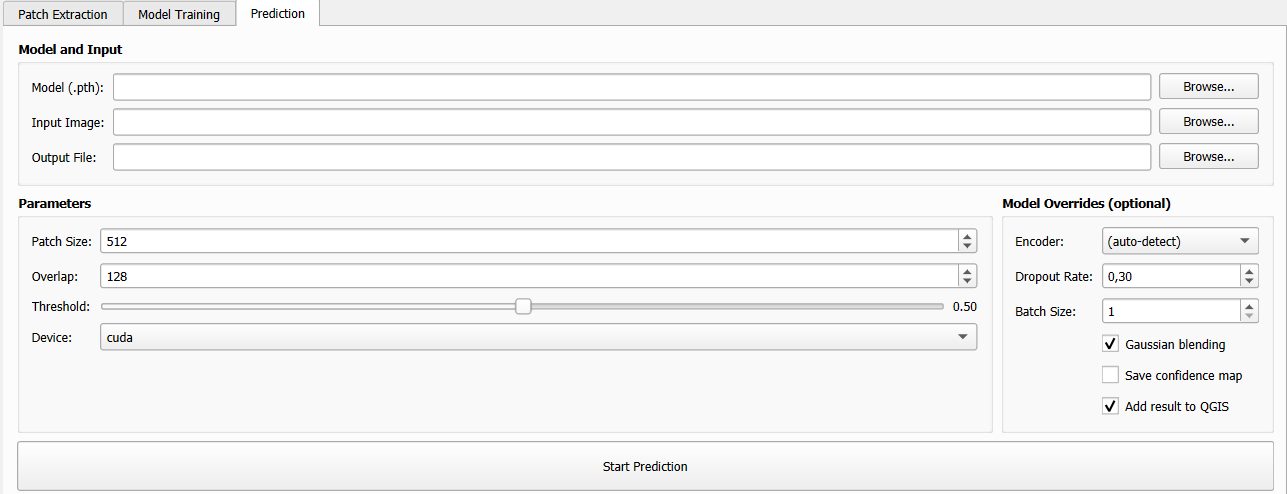
The Prediction tab.
How Prediction Works
Because satellite images are too large to feed directly to a neural network, the prediction engine uses a sliding window approach:
The input image is divided into overlapping patches of size
Patch SizeEach patch is run through the model
Predictions are blended back together using Gaussian weighting (optional) to produce a seamless full-resolution output

Sliding window prediction with overlapping patches.
Model and Input Files
Field |
Description |
|---|---|
Model (.pth) |
Path to the trained model checkpoint ( |
Input Image |
Path to the satellite GeoTIFF to segment. Must have the same number of bands as the training data. |
Output File |
Path for the output segmentation GeoTIFF. The result is a single-band raster with class index values. |
Prediction Parameters
Parameters group (left column):
Parameter |
Default |
Description |
|---|---|---|
Patch Size (px) |
512 |
Size of each inference patch in pixels. Larger patches are faster per pixel but require more GPU memory. Range: 64–2048. |
Overlap (px) |
128 |
Number of pixels of overlap between adjacent patches. More overlap → smoother blending but slower inference. Typical values: 64–256. |
Threshold |
0.50 |
Decision threshold for binary mode only (0.0–1.0). Pixels with predicted probability above this value are classified as foreground. Has no effect in multi-class mode. |
Device |
|
|
Model Override Options (right column)
These optional settings override model metadata read from the checkpoint. Leave them at defaults unless you are using an old checkpoint that lacks metadata.
Parameter |
Default |
Description |
|---|---|---|
Encoder |
|
Override the encoder backbone used during prediction. Leave as
|
Dropout Rate |
0.3 |
Must match the dropout rate used during training. |
Batch Size |
1 |
Number of patches processed simultaneously during inference. Increasing this speeds up GPU inference but uses more memory. |
Gaussian blending |
checked |
Apply Gaussian weighting when merging overlapping patches. Strongly recommended — eliminates visible grid artifacts at patch boundaries. |
Save confidence map |
unchecked |
Additionally save a floating-point GeoTIFF with the raw model output probabilities (binary) or class scores (multi-class). |
Add result to QGIS |
checked |
Automatically load the output segmentation GeoTIFF as a new raster layer in the current QGIS project when prediction completes. |
Gaussian Blending
When Gaussian blending is enabled, each overlapping patch is weighted by a 2D Gaussian kernel before being merged into the final image. This means:
The centre of each patch contributes more than the edges
Abrupt transitions between patches are smoothed out
The final result has no visible “grid” pattern
Gaussian blending is always recommended unless you specifically need hard patch boundaries.
Output Format
The output segmentation is a georeferenced single-band GeoTIFF with:
The same spatial extent, CRS, and pixel resolution as the input image
Integer pixel values representing class indices: -
0/1for binary mode (background / foreground) -0,1,2, … for multi-class mode
If Save confidence map is checked, a second file is saved alongside the
classification result with the suffix _confidence.tif, containing
floating-point values in the range [0, 1].
When Add result to QGIS is checked, the output is automatically added as a raster layer to the current project with a default style. You can then apply your own colour ramp in the layer properties.
Tips for Good Predictions
Match training resolution
Ensure the input image has the same spatial resolution as the images used during training. Feeding a 10m image to a model trained on 30m data will produce poor results.
Match the number of bands
The input image must have the same number of bands (channels) as the images used during training. The model was trained on a specific band configuration; mismatches will cause an error.
Patch Size vs. Overlap trade-offs
Patch Size |
Overlap |
Characteristics |
|---|---|---|
256 |
64–128 |
Low memory, faster |
512 |
128–256 |
Balanced (default) |
1024 |
256–512 |
Slow, high VRAM, best for textures |
GPU out of memory
If you encounter CUDA out-of-memory errors:
Reduce Patch Size (e.g., from 512 to 256)
Reduce Batch Size to 1
Switch Device to
cpu(slower but unlimited memory)
Prediction Log
During prediction, the output panel reports:
Loading model from: /path/to/best_model.pth
Architecture: unet | Encoder: resnet34 | Mode: binary
Input image: 10000×8000 px, 4 bands
Processing 256 patches (16×16 grid)...
[██████████████████░░░░] 72% (185/256 patches)
Prediction complete!
Output saved to: /path/to/output_segmentation.tif
Layer added to QGIS: output_segmentation